
Connecting other systems (API)
Let a mobile app, payroll or HR system or partner software work with EBITS Pay securely through the REST API.
2 min read Updated 19 Oct 2026
EBITS Pay has two parts working together: the web portal you use in the browser (the front end) and a secure REST API (the back end) at /api/v1. A mobile app, a payroll or HR system or a partner's software can use the API to read members, add members, record payments and pull reports. Everything it does follows the same rules and permissions and appears in the audit trail.
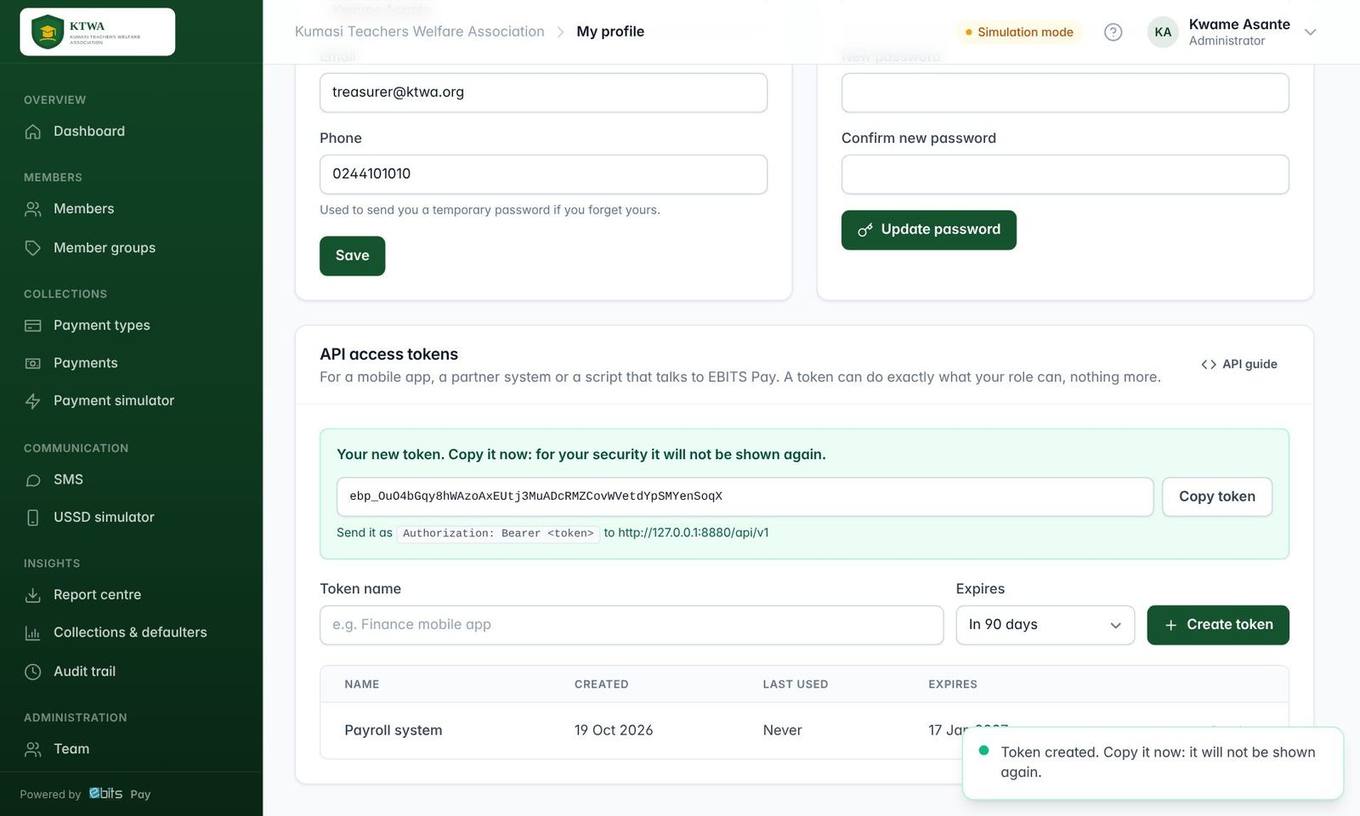
- The person whose permissions the system should have opens My profile → API access tokens.
- Enter a name (for example "Payroll system"), choose when it expires and press Create token.
- Copy the token and give it to the developer with the API guide (button on the same card). Press Revoke to cut access at any time.
Important A token can do exactly what its owner’s role allows, and nothing more. Tokens stop working when revoked or expired, when the user is deactivated, or when an administrator resets the user’s password.
For developers
- Base address:
https://<your EBITS Pay address>/api/v1 - Send the token as
Authorization: Bearer <token>withAccept: application/json. - Full reference: the API guide and the OpenAPI file at /docs/openapi.yaml (imports into Postman or Swagger).